
Concept Product CP093-12 x M.2 SATA SSD for 5.25” Bay (Sneakernet Data Transfer Module) | ICY DOCK Community

Concept Product CP093-12 x M.2 SATA SSD for 5.25” Bay (Sneakernet Data Transfer Module)

icydock_admin

Administrator
Staff member
Jan 21, 2024
172
21
18
Concept Product CP093
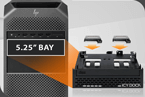
12 x M.2 SATA SSD for 5.25” Bay (Sneakernet Data Transfer Module)

CP093_1280x853_01.webp


👉 Product Page: https://global.icydock.com/product_237.html👈
Any product suggestion or new idea will be highly appreciated!
​

Key Features​


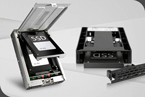
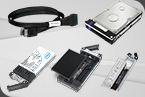
• Fits 12 x M.2 SATA SSD of all length – 30mm 2230, 42mm 2240, 60mm 2260, and 80mm 2280
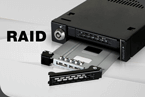
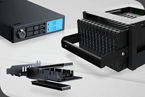
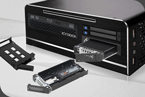
• Two ways drive removal design - Single pull multi-drive ejection mechanism using a single VPX connector or individual drive tray ejection
• Adjustable drive locker holds all length drive securely
• Ruggedized full-metal enclosure meeting flammability requirements
• Uses 3 x miniSAS HD (SFF-8643) and 2 x SATA 15pin power
• Supports full SATA III bandwidth specifications of 6 Gbp/s
• Individual SSD tray - 100% tool-less and screw-less M.2 drive installation (MB840TP design)
• Individual drive LED status indicators
• EMI Grounding – protect M.2 drives from electrical damage
• Anti-Vibration Technology (AVT) – reduces noise and protects against environmental damage
• Active Power Technology (APT) – saves power by shutting down the device when no drive is installed
• Full 3-year warranty with complimentary customer support from live technicians


CP093_featues_01_1.webp

CP093_features02.webp

CP093_features03.webp
 
Last edited:
  • Like
Reactions: juri1309
Is this intended to replace MB872MP-B? I can't find MB872MP-B in stock anywhere, and it having come out several years ago, I'm looking forward to seeing what phase this concept is in? I like that both individual drive trays and entire enclosure can be removed. I also like that it's moved to miniSAS HD connection over Oculink that the MB872MP-B has in the rear. Cables are cheaper and more readily available.
 
Hi Jack,

Thank you for your interest in our CP product, the CP093. Currently, this product is still in the concept stage, as the demand for M.2 SATA drives has not been as strong as we initially anticipated.

For sneakernet-style solutions that are more likely to move forward into production, we recommend taking a look at the CP132 and CP136. These two products support U.2/U.3 drives, which are more widely adopted in the market compared to M.2 SATA.

Please let us know your thoughts. We appreciate you reaching out to us!
 
Ok folks,

With the prices of RAM, NVMe SSDs, and high-capacity HDDs skyrocketing, I think this product could be particularly appealing in the current market.
SATA SSDs are still relatively affordable compared to other storage options, especially used M.2 SATA drives pulled from older laptops, which are readily available on the second-hand market.
You can easily pick up 24 × 512 GB M.2 SATA SSDs for less than €200 these days. That's over 12 TB of raw storage capacity for a very reasonable price!
And since you're working with so many SSDs, you could also achieve impressive aggregate throughput by combining them in RAID 0 or RAID 10,
or also have the possibility to use advanced RAID levels like RAID 50 or RAID 60
that could provide a a wide range of options and good balance between performance, capacity, and redundancy, depending on the configuration.

I can see this product being a great fit for homelabs, DIY storage projects, and small businesses looking for a cost-effective way to build high-capacity storage without breaking the bank.
 
The used-drive angle is interesting, but worth checking the math: CP093 holds 12 drives, so 24 × 512 GB would be 6 TB raw per loaded enclosure, not 12 TB—you'd need two units or swap trays. Also, mixing used M.2 SATA drives in RAID 0/10 can be risky because wear, firmware, and cache behavior vary; RAID 50/60 adds controller overhead and still won't exceed the 6 Gb/s per-lane SATA limit. A smaller pool of matched drives may be more practical for a homelab.
 
The used-drive angle is interesting, but worth checking the math: CP093 holds 12 drives, so 24 × 512 GB would be 6 TB raw per loaded enclosure, not 12 TB—you'd need two units or swap trays. Also, mixing used M.2 SATA drives in RAID 0/10 can be risky because wear, firmware, and cache behavior vary; RAID 50/60 adds controller overhead and still won't exceed the 6 Gb/s per-lane SATA limit. A smaller pool of matched drives may be more practical for a homelab.
1) Just to clarify on the count: I was intentionally referring to a setup using two CP093 units (which gets you to 24 drives),
since that's where high-density modular bays like this one really shine.
But the core point was just to emphasize on the ridiculously low cost per TB.

2) Usually, lots on eBay are of the same model, but mixing models can definitely happen.
In any case, I agree that the most reliable performance is achieved by using the exact same disk model.

3)Regarding wear: sure, used drives will have varying health, but an SSD with 80%–90% endurance left can easily handle 1–2 years of heavy 24/7 use.
Anyway, as long as you take the right precautions, I don't think there's anything to worry about. Always make backups and if you want fewer headaches, a good RAID setup always comes in handy. + Given their ridiculously low price that trade-off makes complete sense for a lot of use cases.

4)RAID configurations really come down to specific use cases and budgets. For instance, pairing multiple HBAs with ZFS (like a Z1 pool) can often outperform a single heavy ROC controller in RAID 5 depending on the hardware, whereas other setups might benefit more from RAID 50/60.
Different strokes for different folks, what doesn't fit one workflow might be ideal for another but the fact that it can be used in so many different situations makes it very versatile. And that, in my opinion, is an added benefit.

5)As for the 6 Gb/s SATA lane limit, it's rarely a bottleneck outside of heavy enterprise virtualization or multi-user access (like 200 concurrent users).
For media archives, document storage, or backup pools, you honestly won't notice the difference.
At the end of the day, it all comes down to designing for your actual workload.
For context, I run 8x 2TB NVMe in RAID 10 for virtualization, 8x 4TB 12G SAS SSDs for corporate data, and 6x 14TB SATA HDDs for backup.

Back when SAS SSDs cost an arm and a leg, if I’d known that 24 SATA SSDs would give me comparable performance at a fraction of the cost, I would’ve signed up for it in a second.